A real integration, end to end
Dog Photobooth is a shipping iOS app that makes vintage photobooth strips of you and your dog. Before Helix it asked every user to photograph themselves and their pet, held those photos, and used them as generation references. That worked, and it meant a consumer app was storing faces.
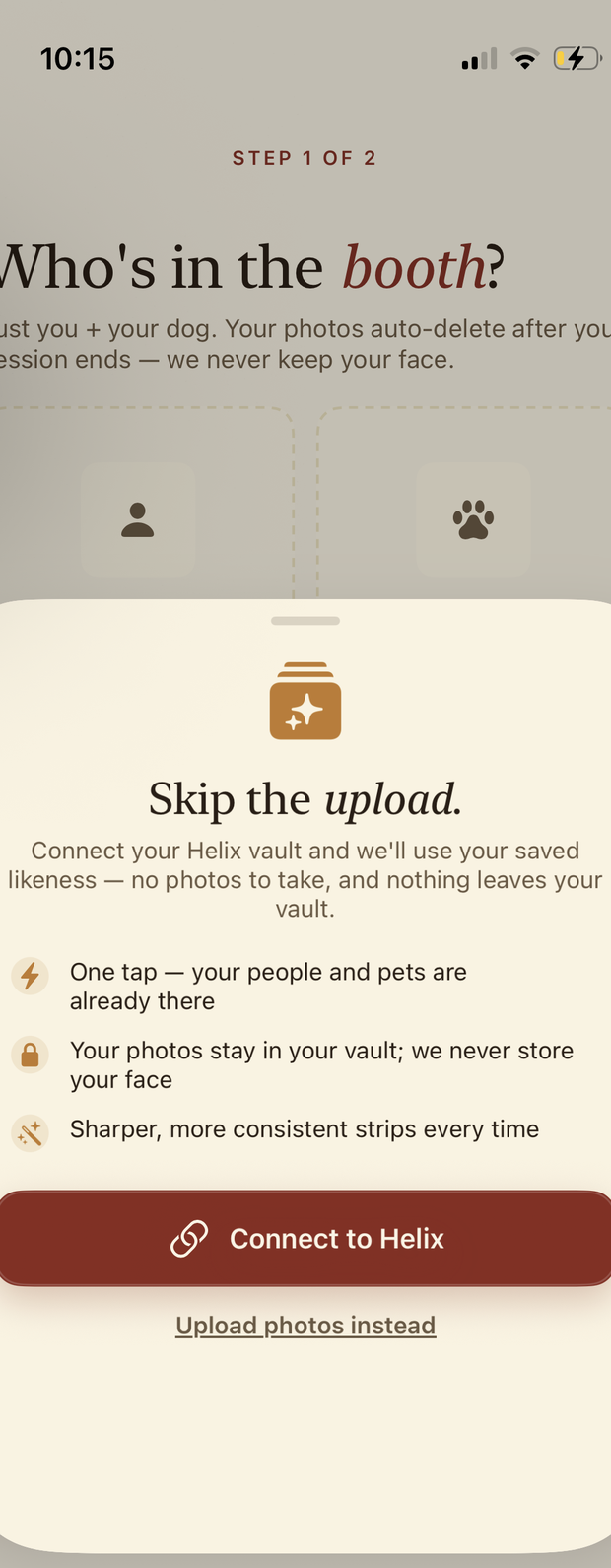
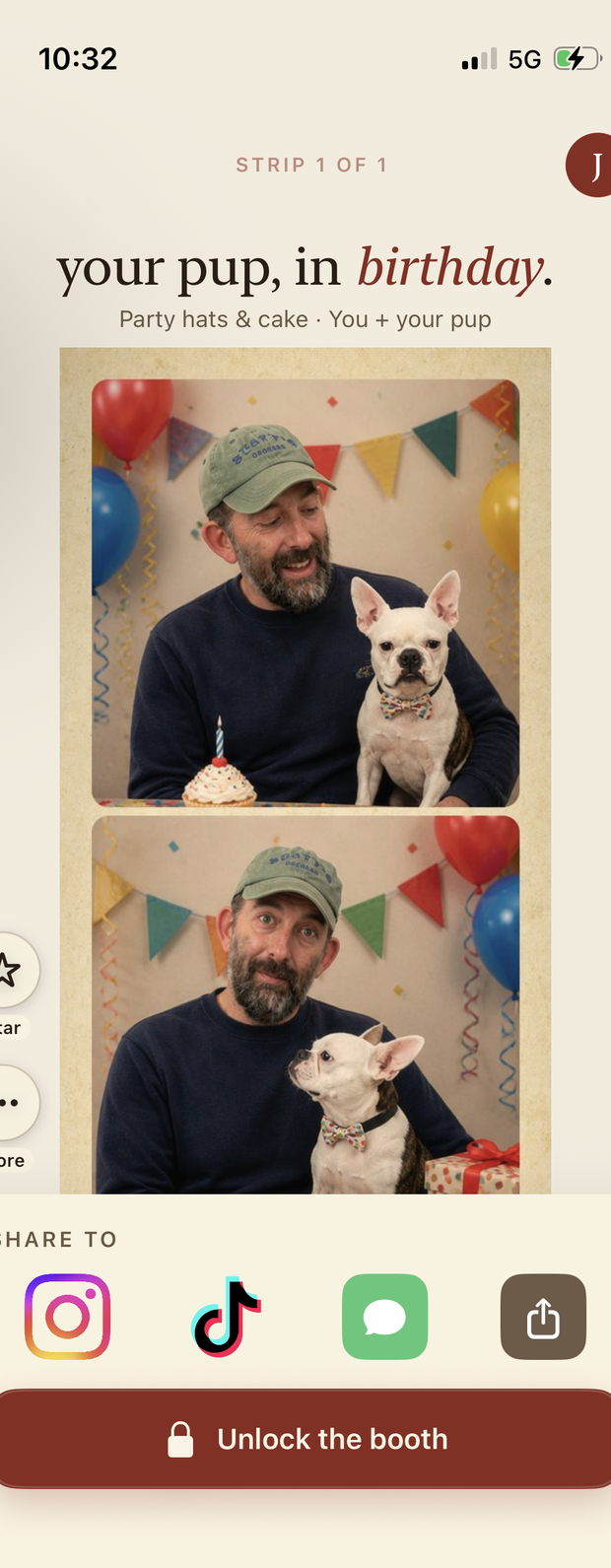
The Helix path removes that. The app makes a photorealistic image of a named person and a named dog and never receives a single source photo. This page is the whole integration: every call it makes, the code that makes it, and the exact thing the vault owner sees on the other side.
Everything below is copied from the shipping app and from the vault it talks to. The screenshots are one real session on 4 August 2026.
Decide who holds the token first
This is the decision that shapes everything else, and it is easier to make now than to unpick later. Dog Photobooth put the token on its own server:
device                          your server                    vault.helix.ai
──────                          ───────────                    ──────────────
/authorize (PKCE consent)  ────────────────────────────────▶   consent page
   ◀── code on custom scheme
   code ──▶  POST /helix/connect
                     token exchange  ────────────────────────▶  /token
                     stores token, refreshes it
                     GET /api/subjects, POST /api/generate ──▶  app door
   ◀── finished image

EXCEPT: device-direct writes. The device gets a short-lived copy of the
token and POSTs the photo to Helix itself, so the server never sees it.
The app runs only the consent leg. It never stores a Helix token, which keeps the credential out of a place you cannot revoke. The one exception is adding a subject, where the point is that the photo must not touch your infrastructure, so the device calls Helix directly with a short-lived token. Both halves are below.
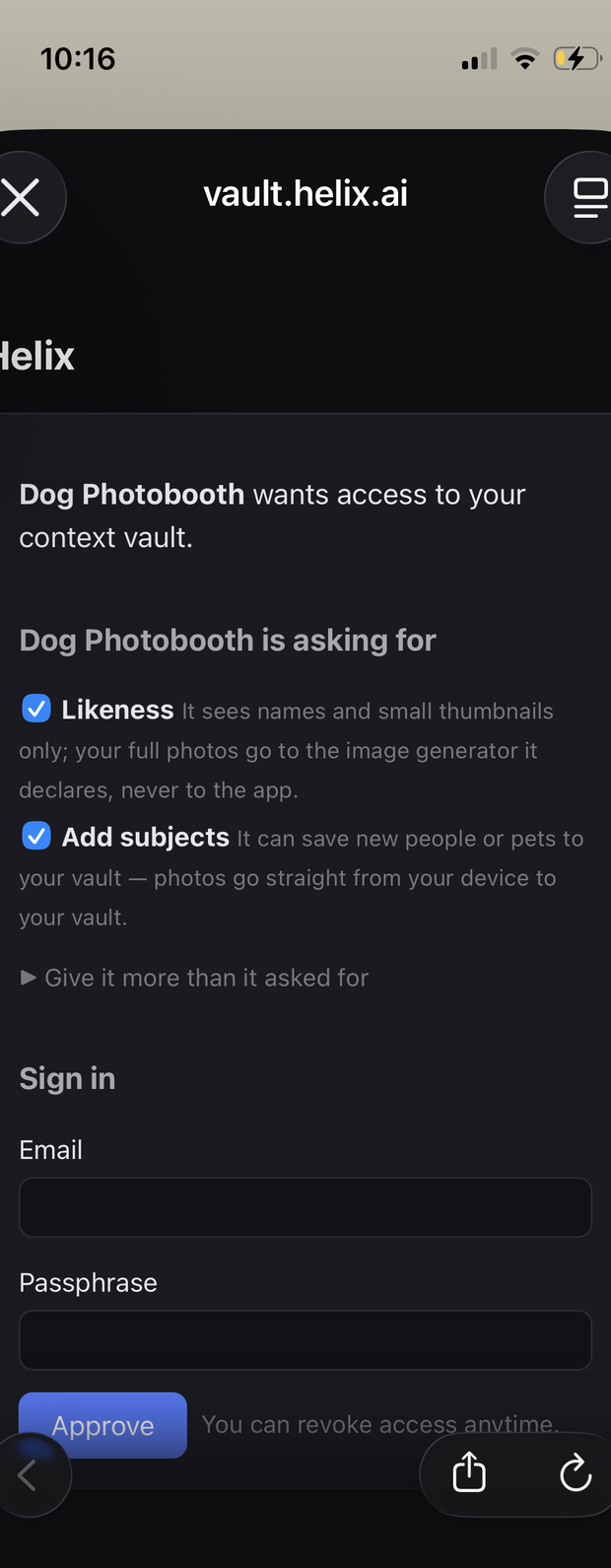
1. Register, and ask for only what you use
Dynamic client registration, once per launch. The scope string is the whole security posture of the integration, so it is worth being blunt about in code:
// HelixManager.swift
private let helixBaseURL = "https://vault.helix.ai"
private let redirectURI  = "dogphotobooth://helix"

/// Minimal scopes — request ONLY what the photobooth uses:
///   likeness       → list vault subjects (names + thumbnails) + generate
///   likeness:write → add subjects to the vault (device-direct upload)
/// We do NOT request `identity`, `preferences`, or the other vault
/// read-categories — those are for agent/MCP clients and the photobooth
/// never reads them. (Reconnect required to change granted scopes.)
private let scope = "likeness likeness:write"

private func ensureClientRegistered() async throws -> String {
    if let clientId { return clientId }
    struct RegisterBody: Encodable {
        let redirect_uris: [String]
        let client_name: String
        let token_endpoint_auth_method: String
    }
    var req = URLRequest(url: URL(string: "\(helixBaseURL)/register")!)
    req.httpMethod = "POST"
    req.setValue("application/json", forHTTPHeaderField: "Content-Type")
    req.httpBody = try JSONEncoder().encode(RegisterBody(
        redirect_uris: [redirectURI],
        client_name: "Dog Photobooth",
        token_endpoint_auth_method: "none"
    ))
    // …decode { client_id } and cache it
}
client_name is user-facing and durable.It is the heading on the consent page, the label in the owner's connections list, and the name on every audit line. It is also how Helix recognises your app across reconnects, since dynamic registration issues a fresh client_id each time. Reconnecting replaces the previous grant rather than stacking a second one, which only works if you keep the name stable. Pick it once.
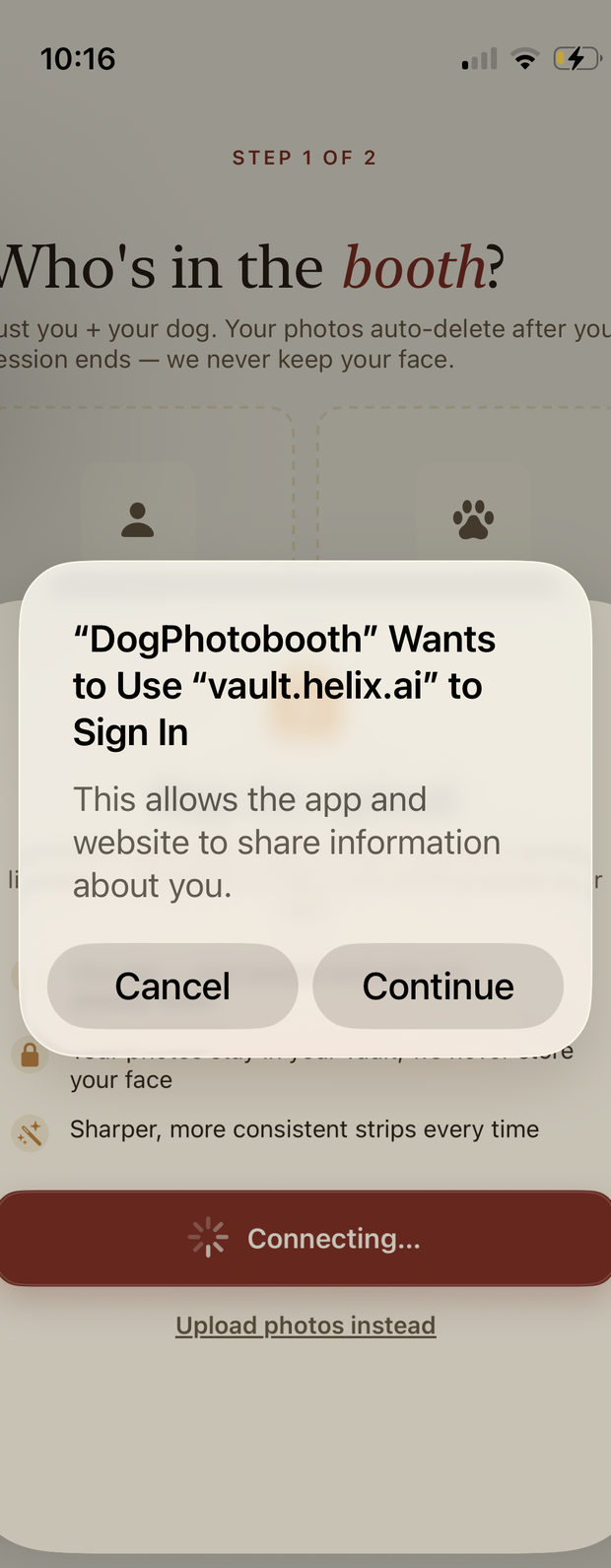
2. Send the user to the consent page
Standard OAuth 2.1 with PKCE, presented in ASWebAuthenticationSession so iOS shows the real domain and the app cannot read the page:
// HelixManager.swift
private func presentConsent(clientId: String, challenge: String) async throws -> String {
    var comps = URLComponents(string: "\(helixBaseURL)/authorize")!
    let state = Self.makeCodeVerifier()   // random opaque CSRF token
    comps.queryItems = [
        .init(name: "response_type",        value: "code"),
        .init(name: "client_id",            value: clientId),
        .init(name: "redirect_uri",         value: redirectURI),
        .init(name: "scope",                value: scope),
        .init(name: "state",                value: state),
        .init(name: "code_challenge",       value: challenge),
        .init(name: "code_challenge_method", value: "S256"),
    ]

    return try await withCheckedThrowingContinuation { continuation in
        let session = ASWebAuthenticationSession(
            url: comps.url!, callbackURLScheme: "dogphotobooth"
        ) { callbackURL, error in
            // …CSRF: the returned state must match what we sent
            guard returnedState == state else {
                continuation.resume(throwing: APIError.badRequest("Helix state mismatch"))
                return
            }
            // …resume with the code, or with the error the user chose
        }
        session.presentationContextProvider = self
        session.start()
    }
}
ASWebAuthenticationSession intercepts the custom-scheme callback itself, so no CFBundleURLSchemes registration is needed for the redirect.
3. Hand the code to your server
The device forwards the authorization code and the PKCE verifier and stops there. The server exchanges them and keeps the token.
// HelixManager.swift
let code = try await presentConsent(clientId: cid, challenge: challenge)

// Hand the code to the server, which does the token exchange.
// The client_id MUST be the one the code was issued to (this app's
// dynamic registration) — the server exchanges on its behalf using
// the PKCE verifier. It's a public client (no secret), so this is
// safe and is the only client_id Helix will accept for this code.
let _: HelixConnectResponse = try await APIClient.shared.post(
    "/helix/connect",
    body: Body(code: code, codeVerifier: verifier,
               redirectUri: redirectURI, clientId: cid)
)
4. Read the cast
GET /api/subjects returns names and thumbnails. No endpoint on the app door returns source photos, to any app, holding any scope. (The owner can export their own photos from their own vault. That door is not this door.) Thumbnails are yours to cache for UI.
// helixService.ts (server)
/** List the vault's subjects (names + thumbnails only; never source photos). */
export async function listSubjects(user: IUser & Document): Promise<HelixSubject[]> {
  const token = await validAccessToken(user);
  const json = await helixFetch<{ subjects?: any[] }>("/api/subjects", { token });
  const raw = Array.isArray(json.subjects) ? json.subjects : [];
  return raw.map((s) => ({
    id: String(s.id ?? s.subject_id ?? ""),
    name: String(s.name ?? ""),
    type: String(s.type ?? s.species ?? "pet"),
    // Helix's REST /api/subjects returns `thumb` (the MCP tool trims it). May
    // be an https URL or a data: URI — the client handles both.
    thumbnailUrl: s.thumb ?? s.thumbnailUrl ?? s.thumbnail_url ?? s.thumbnail ?? null,
  }));
}
The app caches this list so its roster screen renders instantly, and re-fetches whenever the roster opens so a subject the owner deleted in the vault disappears from the app.
5. Generate
Send subject ids and a prompt. Helix pulls the reference photos from the vault, calls the image provider, and returns finished pixels. The references never enter your process.
// helixService.ts (server)
// Contract (helix-mcp src/api.ts): request { subject_ids, prompt, size?,
// refs_per_subject? } → response { image_b64, mime, model, subjects }.
const json = await helixFetch<{ image_b64?: string; image?: string; mime?: string }>(
  "/api/generate",
  {
    method: "POST",
    token,
    body: JSON.stringify({
      subject_ids: opts.subjectIds,
      prompt: opts.prompt,
      // Square so the 2×2 grid slices evenly.
      ...(opts.size ? { size: opts.size } : {}),
      ...(opts.refsPerSubject ? { refs_per_subject: opts.refsPerSubject } : {}),
    }),
  }
);
The response also carries an image_id. Pass it back as refine_image_id on the next call to edit that image instead of generating a new one, which is how you build an iterate loop without re-reading references.
One design note worth stealing. Helix generates whatever the prompt describes, so the photobooth asks for a 2×2 grid in a single image and then slices, grades and banners it locally. Compositing stayed in the app, which meant the brand look survived the swap and the integration was a drop-in replacement for the previous image call rather than a new pipeline.
6. Write a subject without your server seeing the photo
Adding a person or pet to the vault is the one place the app talks to Helix directly. Your server hands the device a short-lived copy of the user's own token, and the photo goes device → vault:
// routes/helix.ts (server)
/**
 * GET /helix/token — hand the app a short-lived, valid Helix access token so it
 * can call Helix DIRECTLY for device-direct uploads (POST /api/subjects). This
 * is how the photobooth backend never touches the user's photos: the image goes
 * straight from device to Helix, never through us.
 */
// HelixManager.swift
func addSubject(name: String, species: String, images: [UIImage]) async throws -> HelixSubjectDTO {
// 1. Short-lived Helix token from our server (never the image).
let tok: HelixTokenResponse = try await APIClient.shared.get("/helix/token")
// 2. Encode photos as JPEG data URIs (downscaled to bound the payload).
let photos: [String] = images.prefix(8).compactMap { img in
guard let jpeg = img.downscaledJPEG(maxDimension: 1280, quality: 0.85) else { return nil }
return "data:image/jpeg;base64,\(jpeg.base64EncodedString())"
}
// 3. POST straight to Helix — bearer token, no photobooth backend hop.
var req = URLRequest(url: URL(string: "\(tok.baseUrl)/api/subjects")!)
req.httpMethod = "POST"
req.setValue("Bearer \(tok.accessToken)", forHTTPHeaderField: "Authorization")
req.httpBody = try JSONEncoder().encode(Body(name: name, species: species,
thumb: thumb, photos: photos))
let (data, resp) = try await URLSession.shared.data(for: req)
// …403 → the connection predates likeness:write; prompt a reconnect
}Once Helix returns 2xx, nothing may throw. The subject is saved. If your response decoding then fails, reporting an error to the user is a lie that makes them add it twice. Dog Photobooth synthesises a local record on a decode miss and lets the next background refresh reconcile. This is the single most common bug we see in write paths.
7. Build for revocation
The owner can revoke you from a web page while your job queue is mid-flight. That is not an edge case, it is the product working. Treat a dead token as a state, not an exception:
// helixService.ts (server)
export async function validAccessToken(user: IUser & Document): Promise<string> {
  if (!user.helixConnected || !user.helixAccessToken)
    throw new HelixError("User is not connected to Helix", 401, true);

  const soon = Date.now() + 60_000;
  const exp = user.helixTokenExpiresAt ? new Date(user.helixTokenExpiresAt).getTime() : 0;
  if (exp > soon) return user.helixAccessToken;

  // Expired/near-expiry — try refresh.
  if (user.helixRefreshToken && user.helixClientId) {
    try { /* …refresh, persist, return tokens.access_token */ }
    catch (err) {
      if (err instanceof HelixError && err.revoked) {
        markDisconnected(user);   // fall back to manual upload
        await user.save();
      }
      throw err;
    }
  }
  // No refresh path and token is stale — treat as revoked.
  markDisconnected(user);
  await user.save();
  throw new HelixError("Helix token expired and cannot be refreshed", 401, true);
}

export function markDisconnected(user: IUser & Document): void {
  user.helixConnected = false;
  user.helixAccessToken = null;
  user.helixRefreshToken = null;
  user.helixTokenExpiresAt = null;
  // Keep helixClientId + helixVaultId — reconnecting reuses the registered
  // client and lands on the same vault.
}
Because Helix was the preferred path and not the only path, revocation degrades the app to manual upload instead of breaking it. If your app cannot function without a vault, you have coupled your uptime to a button the user is encouraged to press.
What the owner saw
Every call above wrote a line the user can read. Here is the same session from their side.
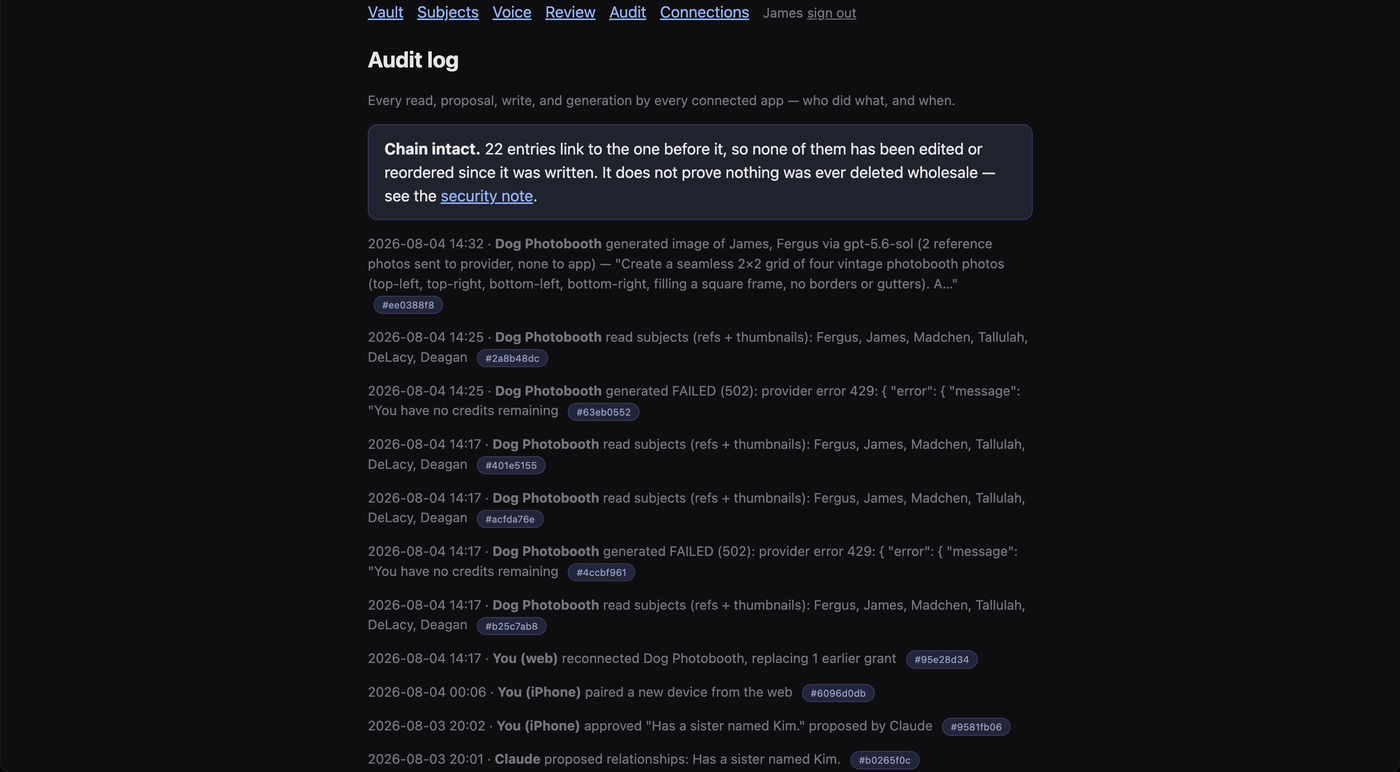
The line your generate call produces looks like this:
2026-08-04 14:32 · Dog Photobooth generated image of James, Fergus
via gpt-5.6-sol (2 reference photos sent to provider, none to app)
— "Create a seamless 2×2 grid of four vintage photobooth photos…"
Two things follow from that. Your prompt is visible to the user, so write prompts you are willing to have read. And failures are logged too, with the provider's status, which means a bad afternoon on your side is legible rather than mysterious.
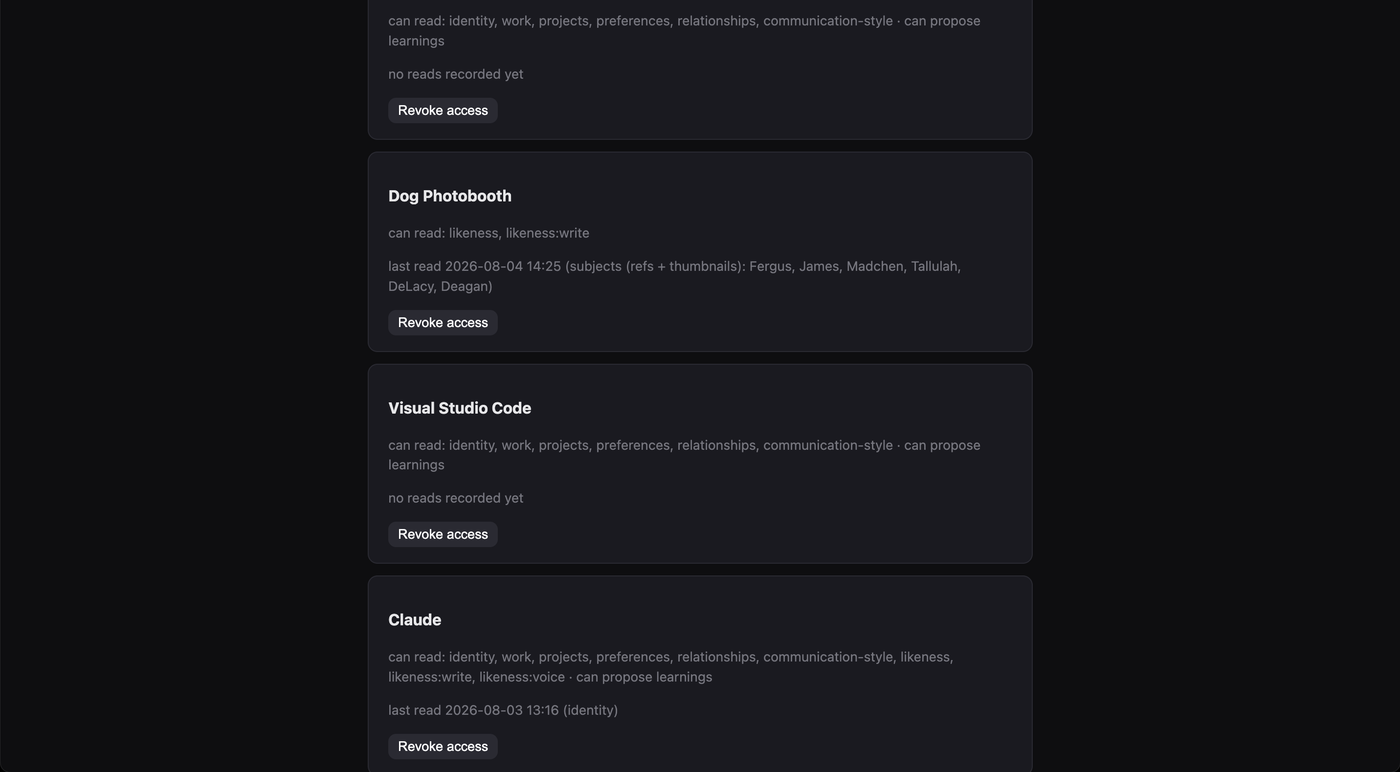
Note the last-read line names the subjects that were returned. Dog Photobooth reads the whole roster to render a picker, so all six names appear for a session that used two. That is disclosed and permitted, but it is the kind of thing an owner notices, and scoping your reads to what you are about to use reads better.
What to copy
- Ask for two scopes, not eight. The consent page shows the owner everything, and the connections screen keeps showing it afterwards.
- Keep the token on your server. Keep photos off it. Those point in opposite directions, which is why the device-direct write exists.
- Make the vault the preferred path, not the required one. It protects existing users, and it survives revocation.
- Assume the grant dies mid-session and degrade to something that still works.
- Pick
client_nameonce and never change it.
The endpoint reference is at REST — apps, the scope list at Scopes & consent, and the rules you are agreeing to at the trust contract. Vaults are open to anyone at vault.helix.ai; the app door is still by conversation, so tell us what you're building.